Using NPM audit from a frontend perspective

How many times have you run npm install and have seen the following?
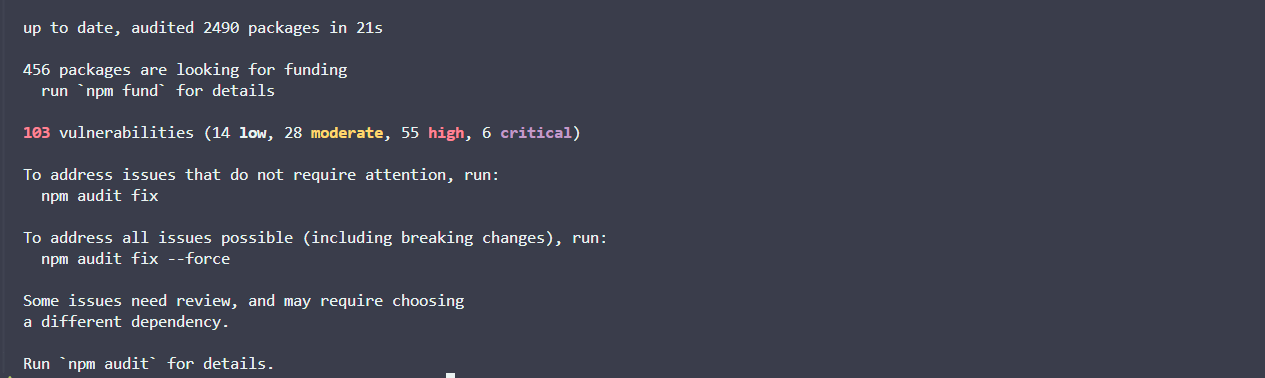
A large swath of vulnerabilities, ranging in severity, appears in your logs.
Looks pretty serious, right?
Well, that depends on a multitude of factors - factors that typically fall within a frontend developer’s remit.
Why should you care?

There has previously been a lot of cynicism about npm audit and its functionality.
When we npm install we are not only pulling in packages listed in our package.json, but we are also installing all the sub-dependencies of those packages.
We have very little visibility into what we are pulling into our project unless we explicitly go looking for the breadcrumb trail. This is primarily why NPM is providing a breakdown of vulnerabilities whenever you install a package.
But why should we actually care? Well, since packages with critical vulnerabilities can wreak havoc in our projects. We should really pay close attention when NPM highlights it.
Many developers associate it with false positives and setting off alarm bells for no reason.
I disagree with this primarily because the results from NPM audits are essentially just an aggregation of security data. They are displaying vulnerability information that other providers would highlight, but in a lighter version, which benefits frontend developers as we are not typically security versed.
Consider the following:
- NPM has not flagged your project’s dependencies on a whim, but rather it has collected information from multiple security providers to inform you of vulnerabilities on a per-package basis.
- Its advantage over other tools lies in its ability to give information as close as possible to a developer’s workflow.
- For frontend developers, it might be their first-ever touchpoint with legitimate security data.
Even still, these messages can be an almost daily occurrence, and yet they are perceived as noisy, hard to understand, and lacking context.
This is why I’m trying to ascertain a solid understanding of NPM audit information, while keeping in mind that NPM audit information equates to a lighter version of most modern security tools - Snyk, for example.
Running NPM audit on a old project

In any of your projects with node packages, you can run npm audit for a detailed view of vulnerabilities assigned to them.
I’ve taken an old personal project, and I’ve going to run npm audit within it:
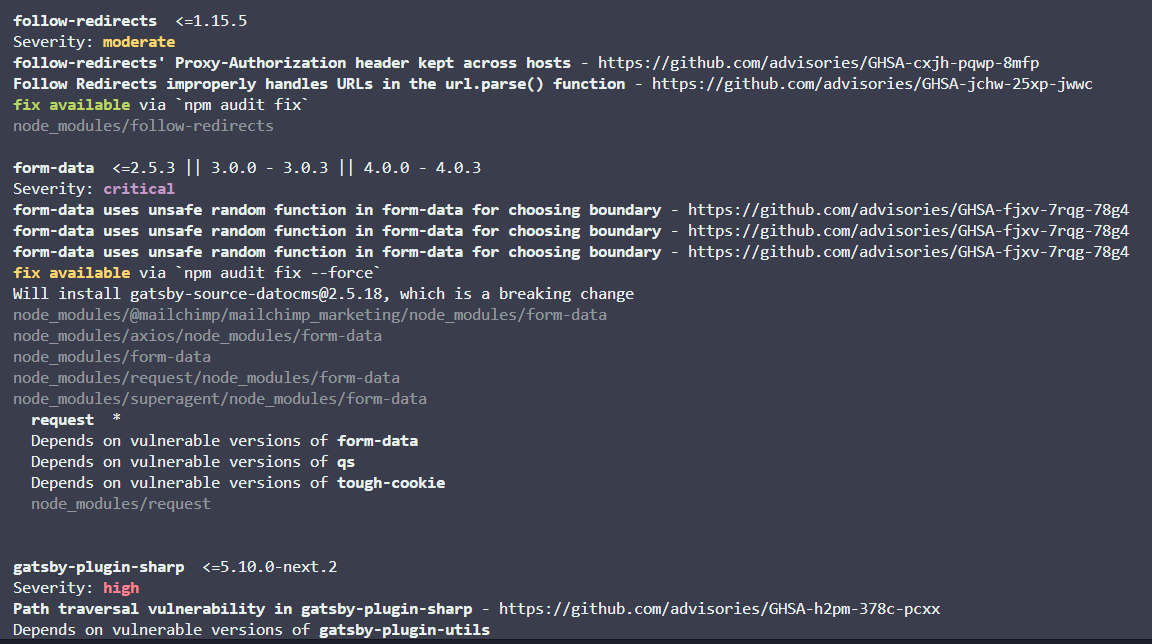
We can see an example of a critical severity package.
In the case of my legacy project, it was the form data library. We can follow the link to the GitHub Security Advisory database and examine it further:
form-data uses Math.random() to select a boundary value for multipart form-encoded data. This can lead to a security issue if an attacker:can observe other values produced by Math. random in the target application, andcan control one field of a request made using form-dataThis severity has a CVSS score of 9.4, which should really make us nervous that it’s being pulled into our project.
Now, the chances of it being maliciously exploited are very situational. This can also be predicted via another metric called an EPSS score.
However, let’s assume that we do not know these quantifying metrics (and as a typical frontend developer - why would you?). How do we actually fix the thing?
Well, we can see that the NPM audit also suggests updating the package to versions where fixes for the vulnerabilities have been patched.
We can simply run npm audit fix all.
However, it’s important to carve out time to run this, as it’s inevitable that there will be breaking changes somewhere.
In fact, NPM will notify when a breaking change is expected:

Trade offs
On larger projects, we have to weigh up the trade-offs of dedicating time to fixing vulnerabilities vs disrupting feature work - the prioritization of this is obviously helped by the provided vulnerability ratings (critical, high, medium, low, etc.).
However, there is still nuance in whether a vulnerability should be addressed urgently.
For example, if one of our dev dependencies is highlighted as vulnerable via npm audit, that is very important context. The execution environment is now completely different when compared to the vulnerability that is shipped in our project’s source code.
Additionally, running npm audit/fix in CI/CD is a big decision that could really slow down your deployment process.
A deep understanding of how your project is using a library will also inform your decision. But let’s be real, I, like many other frontend developers, am not a security expert.
As a result, we have to leverage native tooling within NPM and other security tools to help inform our decisions. I believe once we start following patterns and tracing CVEs, we can start painting a picture of what’s vulnerable and why.
Tooling

Security is an incredibly complex domain, and one where we should lean on external tools help guide us. I believe that even surface-level knowledge will make your projects safer and help you stand out as a frontend/full-stack developer.
A lot of security tools try to market themselves on being a catch all for what NPM audit misses. And yes, there is so much depth that other tools cover, but as a first port of call, why not dip your toe in and understand the information that npm audit provides?
In my opinion, it provides a great starting point in understanding the security ecosystem, and it’s just there, in the foreground of your terminal, churning out useful information.
I’m hoping to go deeper into topics like this while furthering my understanding of this ever-changing space - especially as it relates to frontend development. Please subscribe if that interests you!